Keystone Beta is here: see all new features!
Origins 07 Oct 2026 1 767 7

Ready to see your favourite hotel in a new light? Project Keystone, the new client for Habbo Hotel: Origins, is opening its doors in open beta today! There’s plenty to see and explore for everyone, just remember: this is an open beta! Expect bugs, updates and changes along the way as the team keeps working on it.
Join through Steam
At this moment, the open beta for Keystone is available only through Steam. Using the new client does not require you to link your Habbo account to your Steam account, but Steam is required to download, install, and update the client until it is added to the Habbo Launcher at a later date.
To join Keystone, open your Steam Library and follow these steps:
- Right-click 'Habbo Hotel: Origins’ and select 'Properties’.
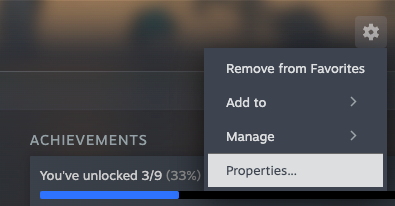
- Open the 'Game Versions & Betas’ tab.
- Under 'Private Versions’, enter the code `habbokeystone`
- Click 'Check Code’ to join the beta branch.
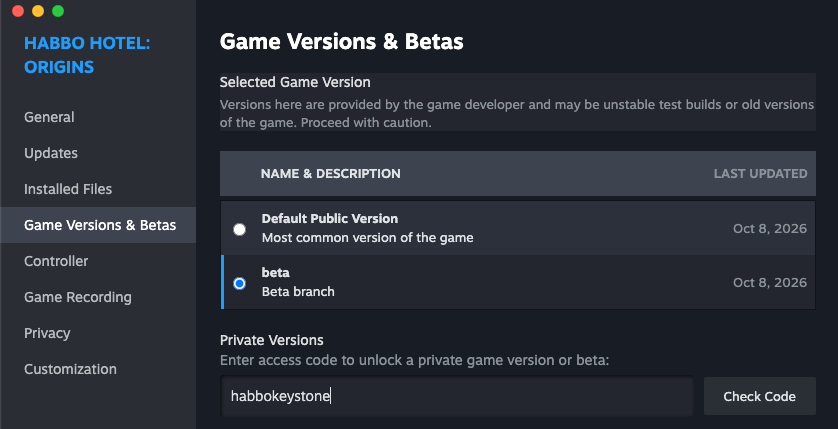
- Select the 'beta' branch in the list above and Steam will start updating your client.
- Once the update has downloaded, press 'Play’ to open the Launch Settings window.
- Select 'Habbo Origins Keystone Beta’ and press 'Play’ once more.

Now you’re ready to take a look around!
Three Hotels, One Client
Keystone opens to a new 'Server Selection', letting you choose between the English, Spanish and Brazilian hotels from one client. If you play on more than one hotel, that should make hopping between them a little easier.

Your client language is a separate choice, too. Whichever hotel you connect to, you can freely change the language of the interface. The hotel view you see now follows your chosen language, rather than the hotel you’ve joined.
Once you have made your choice, hit 'Enter Hotel' to start playing!
Interface Improvements
Upon entering a room, one of the first changes you might notice is the reworked interface in the bottom-left corner. All the info related to the room you are in is now consolidated in a new widget, which introduces some new useful functions.

By clicking on one of its buttons, the widget will expand to display the new Players, Furni, and Chat panels. These offer more features than the ones you have gotten used to in the Shockwave client.
The chat history panel has been reworked and now provides more useful information. Messages sent by the room owner are highlighted, and any player entering and leaving the room is logged for your convenience. In addition, the logs are now split between three distinct tabs: Room, Whispers, and Alerts.

The People panel, previously known as Chooser, now displays a small image for each Habbo to make them easily identifiable. This makes it far easier to find a player in the list when you have a rough idea of their Habbo’s outfit, but when they are hiding behind a pesky pillar. And to make it easier to find your friends in busy rooms, friends are now displayed at the top of the list!

Selecting a Habbo in the list reveals buttons that were previously available only in their Infostand. This allows you to more easily trade with the right player or block someone you would rather not see. And to top things off, the selected Habbo will display a bright outline in the room to make sure you know exactly where they are.

Builders will be ecstatic to discover the new Furni panel, which now offers more actions to help you build your next room. Each furni can now be highlighted in the room by pressing the 'Find' button, and bulk actions are now available for picking up or rotating multiple furni simultaneously.

For those who prefer the classic approach of having individually floating windows, and for those who would like to keep an eye on more than one panel at a time, the panels can 'pop out' into individual widgets. You are then free to move them across the game window and resize them to your hearts content.

Zoom, Pan, and Chat
One of Keystone's most awaited features is the ability to play in 'Full screen' and otherwise resize the game window to fit your monitor. Where the Origins client was previously only available in 'Default' and 'XL' sizes, you can now resize the game more freely.
This more flexible approach introduces the ability to zoom in and out at will using the scroll wheel, and panning the camera by holding down your left mouse button when dragging. Whether you are trying to align furni with pixel-perfect precision or are playing hide-and-seek with your friends, this new functionality is bound to be incredibly helpful!

The chat bubbles have been reworked to follow the room as you zoom and pan around. In the new 'Modern' chat style, chat messages will adjust their position to better connect to players and wide messages will overflow into taller bubbles, which is especially useful in busy rooms.

Using the unique Emoji's known and loved throughout the Hotel has gotten easier, too! You can now start typing ':' followed by the name of the emoji for it to suggest available emoji to you, and pressing Enter will insert the selected emoji!

Game Menu
Accidentally closed the game by pressing the Escape key? Whether you have a curious dog or drop your phone to have it bounce off and make you leave mid-conversation, it happened to the best of us. Keystone solves this long-standing annoyance by introducing a brand new Game Menu that opens when pressing the Escape key.
This menu offers gameplay, graphics, and audio options. In addition to some settings you have already been familiar with, new experimental graphics options allow you to enable improved lighting shaders and a brand new chat style option gives you the ability to switch between classic and modern chat.

Private Room Lighting
One of Keystone’s most eye-catching additions is an experimental lighting shader in private rooms. When enabled in the ‘Graphics’ tab of the Game Menu, players will see brand-new effects on light-emitting furni. In addition to lighting settings, new options to configure the ambience of a room are now available to builders too!
Room owners can open the avatar menu at the bottom-left of the game window to access the lighting settings and try a different atmosphere for their build.

Through the menu, you can configure the lighting options for the general room ambience, window effects, and furniture glow. The changes are not visible to other players in your room until you press the save button, so feel free to experiment! Several presets are available too for your convenience. If your room utilizes a Moodlight to set the mood, you can decide whether your room lighting settings will blend in, or respect the moodlight.

That’s all you need to know to start experimenting with lighting effects! Try placing a window or lamp and see how it affects the environment. Whether you want to build Habbo’s best disco or prefer a darker mood for Halloween, these new lighting options will help you achieve your dreams (and nightmares)!

The room lighting choices are visible to visitors who have shaders enabled in their game menu. If you’re visiting a room and wondering why it looks different in someone else’s screenshot, check your graphics settings! As an experimental feature, lighting is likely to change during the coming months.
Turn Up The Volume!
Origins is getting a little more musical. Keystone adds background music at startup and on the hotel view, while select public rooms such as the Hotel Kitchen, Infobus Park, Port Hana and Snouthill Pier have been given background music of their own. It’s a lovely reason to revisit these public rooms and take in the atmosphere.

Everyday interactions have more sound now, too. Most furni actions, including placing, rotating and clicking items, come with new sound effects. Fishing also gets audio feedback, adding a little extra life to your time by the water. You can explore the audio options through the game menu to adjust things to your liking.
New Game: The Forgotten Grove
In the mood for action? Head to the Game Centre to try The Forgotten Grove. This brand new activity, inspired by Glukko’s discovery of Deepgrove, is now available to test through the Keystone client. Players compete to capture as many ducks as possible, while throwing water balloons to disrupt the other team.


Gather some friends, get your throwing arm ready and keep your eyes on those ducks!
The Sky is the Limit
The improved technical foundation of Keystone is incredibly exciting for room builders. Furni is now downloaded on demand while playing instead of downloaded before you step foot in the hotel. This allows the game to add new and more complex furni with less limitations. You might briefly see transparent boxes while an item’s graphics load, but they should fill in as the download finishes. This approach gives Keystone room to support a much larger furniture collection as Origins grows.

Speaking of improvements, this new technical base offers Origins the ability to lift the pesky Sprite Limit that builders have been fighting against over the past two years. The developers have stated that the sprite limit in private rooms is likely to be removed at a later date, once the existing Shockwave client has been phased out. That’s something to look forward to after the transition!
Classic Origins, new foundations
Underneath all these additions, Keystone is a complete rebuild of the Origins client in C++, moving away from the Shockwave technology. This allows the game to offer what players expect of a modern-day game, while retaining the classic look and feel of Habbo Hotel: Origins. Performance has been greatly improved and long loading times and script errors are now a memory of the past.
Origins players have long requested for the game to receive a mobile client, and the team has hinted that Keystone’s modern architecture removes most restrictions that have prevented this from happening. There is no further information with regards to a future mobile client release, but it’s clear the chance of this being prioritized has greatly improved.
Grab your BETA Badge!
Players who play on the Keystone client can win the following two badges!


Grey badge: awarded to everyone who takes part in the beta.
Colour badge: awarded to everyone who spends more time on the Keystone beta client than on the original client during the beta.
Give Keystone a spin, revisit your favourite rooms and see what catches your eye. If you spot a bug or something that feels off, share your feedback with the Origins team through the official Discord server. Your feedback is valued and shapes what comes next!